I gave five AI models the same product engineering task (aka the slop evals)
Most AI coding benchmarks are too clean.
They ask a model to solve a small, isolated problem with a clear answer. That is useful for measuring coding ability, but it is not how product engineering works.
Real product work is messy. Requirements are sometimes incomplete. The existing codebase has opinions. Security, billing, tests and UX all matter at the same time. The difficult part is often not writing the code, but making dozens of small decisions without breaking something else.
This weekend I ran a small home experiment. I gave five AI models the same product engineering task three times each. Fifteen runs and fifteen pull requests later, the differences in quality, time and cost were bigger than I expected.
This is not a scientific benchmark. The models ran through different coding tools, the tools report tokens differently and three runs per model is a small sample. But it is close to how I actually use coding agents, which makes the results useful to me.
The idea
I started with a TanStack and Cloudflare boilerplate that already included authentication, billing and an existing dashboard.
The task was to add MCP server connections to the dashboard. Users needed to be able to connect, reconnect, edit, test and disconnect an MCP server. Free users could connect three servers, while paying users had no limit.
This was deliberately not just a UI task. The prompt also required each model to:
- implement the database, API, domain logic and interface
- discover OAuth configuration and complete the authentication flow
- encrypt credentials before storing them
- enforce billing limits on the server
- protect against SSRF, unsafe redirects and credential leakage into logs
- add useful tests and document its assumptions
- use the existing design patterns
- test the feature in a browser and create a pull request
The prompt was specific about the important security boundaries but left enough ambiguity for the model to make product and engineering decisions. That was the point. I wanted to see how each model handled the gaps, not only whether it could generate code.
View the original prompt
Add a feature to the dashboard page (/dashboard) that allows a user to connect MCP servers to this application. Free users are allowed to connect 3 MCP servers max, paying users can connect unlimited servers. Showcase the already configured MCP servers in a grid format. Follow the existing design and UI patterns in this project.

The MCP server connection flow should include configuring the server URL, OAuth discovery, and allowing the user to authenticate with their MCP server. The state should then be saved in the database so the user can utilize the MCP server in their chat sessions. Encrypt the auth data before saving it in the database. Put extra focus on creating a smooth user experience by providing clear feedback and error handling. Add subtle micro animations to enhance the user experience when the user interacts with the MCP server connection flow.

Ideal customer profile:
A technically skilled user who wants to automate parts of their workflow using MCP servers.

As part of the implementation, create a markdown doc and list all the micro-decisions or assumptions made during the implementation. And document anything that couldn't be fully verified.

Important:
- Do not weaken existing authentication, billing, or security controls to simplify the implementation.
- Do not expose secrets or authentication tokens to the client.
- Enforce limits server-side, using the project’s existing billing/entitlement system.
- Include connect, reconnect, edit, test, and disconnect states.
- Require protection against SSRF, unsafe redirects, and leaking credentials in logs.
- Encryption keys must be configured in environment secrets, not the database or source code.
- Add meaningful tests for domain logic, API errors, authorization, and the three-server limit.
- Don't run DB migrations automatically
- Don't auto deploy this project
- Implement the entire feature end-to-end including DB migrations, API, domain logic and UI
- Follow the existing design and UI patterns in this project
- Once the implementation is complete, create a PR in github

Nice to have:
- Screenshot the newly built feature and save the screenshots in the repo
Methodology
All fifteen runs started from the same baseline commit and the same prompt. Each run used a fresh working directory and had access to agent-browser for browser testing.
I treated each model and its coding harness as one package. I did not try to normalize context management, tool use or permission flows because those are part of the experience. Human intervention was limited to permissions and operational prompts; I did not guide the implementation decisions or fix the generated code.
You can inspect all fifteen pull requests and implementations on GitHub.
The models
I tested a mix of expensive frontier models and cheaper alternatives:
| Model | Harness | Runs |
|---|---|---|
| GPT-5.6 Sol | Codex CLI | 3 |
| Fable 5 | Claude Code CLI | 3 |
| Kimi K3 | OpenCode CLI | 3 |
| GLM-5.2 | OpenCode CLI | 3 |
| DeepSeek V4 Pro | OpenCode CLI | 3 |
Using different harnesses makes this less controlled, but also more realistic. A model is only as useful as the agent around it. Tool use, permissions, context management and cost visibility are part of the product.
A note on the numbers
The tools do not report tokens in exactly the same way.
Codex reports total input tokens with the cached portion included. Claude Code reports input, cache reads and cache writes separately. OpenCode reports input and cache reads separately. Its JSON exports also provide exact wall time and reported cost.
Codex did not expose a dollar cost. The GPT figures below are lower-bound, API-equivalent estimates - not actual Codex spend. Time and cost are useful, but they do not tell us whether the result was good. That required code review(s).
Results at a glance
| Model | Average session time | Average cost | Cost across 3 runs | Average quality |
|---|---|---|---|---|
| Fable 5 | 2h 15m 19s wall time* | $34.16 | $102.49 | 4.0/5 |
| Kimi K3 | 1h 9m 26s | $8.19 | $24.57 | 3.3/5 |
| GPT-5.6 Sol | 38m 20s | ~$9.74 API-equivalent† | ~$29.22 API-equivalent† | 3.0/5 |
| GLM-5.2 | 49m 32s | $5.14 | $15.43 | 3.0/5 |
| DeepSeek V4 Pro | 13m 14s | $0.09 | $0.27 | 2.7/5 |
*Fable’s average API time was about 27 minutes. The remaining wall time was mostly idle time and waiting for my input. Permission prompts contributed to that delay.
†Codex did not report spend. The GPT figures estimate what the same tokens would cost at standard API rates and exclude unreported cache-write costs.
The range is ridiculous. Fable averaged more than two hours of wall time and $34 per run. DeepSeek averaged thirteen minutes and nine cents.
The code review explains part of that difference. Fable produced the best output. DeepSeek produced the weakest. Cheap and fast did not mean better in this experiment.
How I defined quality
Quality meant how close a pull request was to something I would be comfortable shipping. I reviewed feature completeness, correctness, security, tests, UX, maintainability and the quality of the model’s assumptions.
This is still a subjective review. That is unavoidable. Product engineering quality cannot be reduced just to whether the code compiles.
A 3/5 was a useful foundation that needed material changes. A 4/5 was a strong implementation with smaller issues. A 5/5 would be close to ship-ready.
Final quality ranking
| Rank | Model | Average | Result |
|---|---|---|---|
| 1 | Fable 5 | 4.0/5 | Best quality and most consistent |
| 2 | Kimi K3 | 3.3/5 | The surprise of the experiment |
| 3 | GPT-5.6 Sol | 3.0/5 | Consistent, but needed material changes |
| 4 | GLM-5.2 | 3.0/5 | Tied on score, weaker in the overall review |
| 5 | DeepSeek V4 Pro | 2.7/5 | Fastest and cheapest, but lowest quality |
GPT-5.6 Sol: quick and consistent
GPT finished every run in 38–39 minutes. It made between 87 and 110 tool calls, and its reasoning output grew across the three sessions.
Every implementation scored 3/5. The consistency is useful, but the code still needed some changes before I would ship it.
| Run | PR | Quality | Session time | Total input (cached) | Output (reasoning) | API-equivalent cost |
|---|---|---|---|---|---|---|
| 1 | #16 | 3/5 | 38m | 10.40M (10.03M cached) | 59,331 (12.9K reasoning) | ~$8.64 |
| 2 | #15 | 3/5 | 38m | 12.51M (12.26M cached) | 55,208 (17.5K reasoning) | ~$9.04 |
| 3 | #17 | 3/5 | 39m | 16.41M (16.13M cached) | 68,983 (21.5K reasoning) | ~$11.53 |
I calculated the estimates using OpenAI’s standard API pricing: $5 per million uncached input tokens, $0.50 per million cached input tokens and $30 per million output tokens. Codex did not report cache writes, which are priced separately, so these are lower-bound API equivalents rather than actual spend.
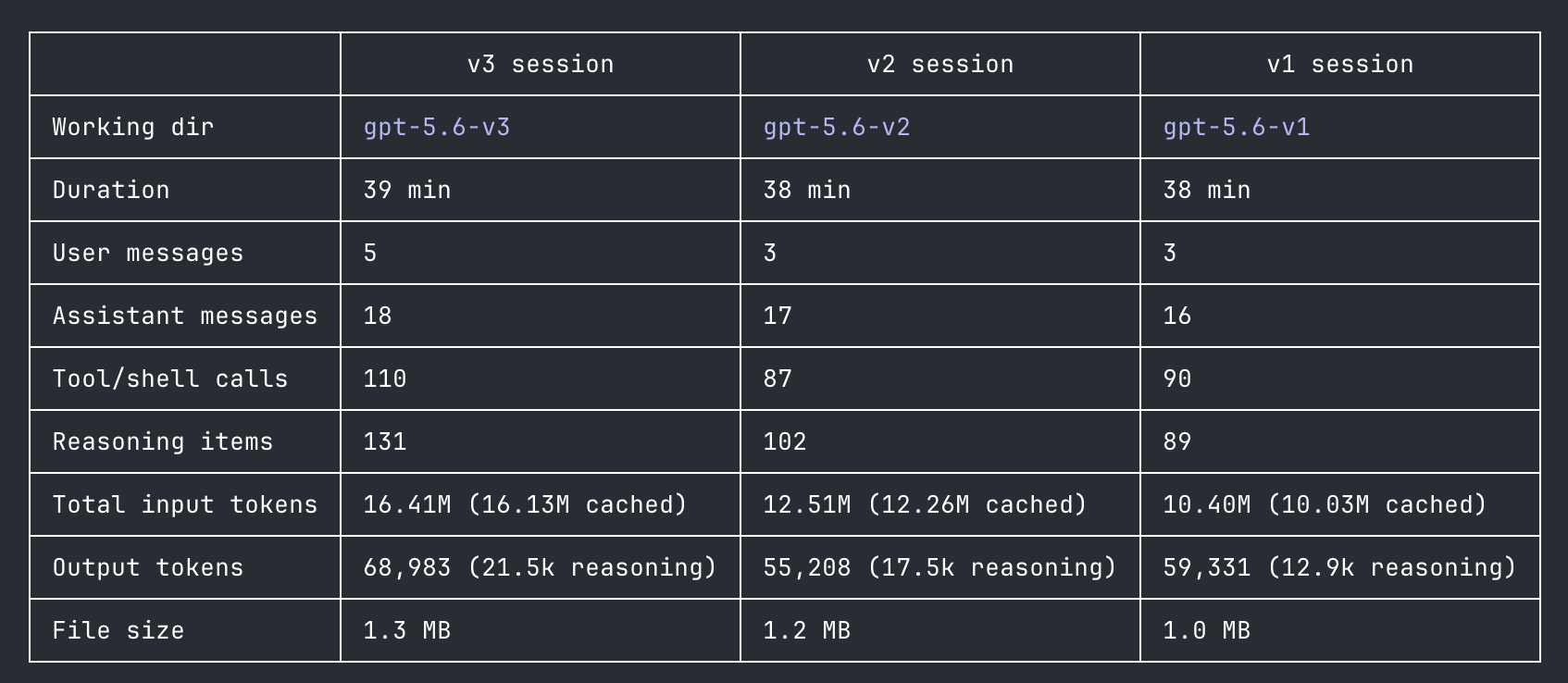
Verdict: a good alternative to Fable when you want faster iteration and can accept more review work.
Fable 5: the best output, at a price
Fable was remarkably consistent. All three runs scored 4/5, took about two hours and fifteen minutes of wall time and cost roughly $34. Each run also added around 3,800–3,900 lines of code.
Consistency is valuable, but a 3,900-line diff is not automatically a good thing. Someone still has to review and maintain it. In this case, though, the larger and more expensive runs also produced the strongest implementations.
Fable created the most operator friction. One session repeatedly asked for approval to run Git and GitHub commands even though the commands had already been allowed. Weird quirk I noticed - and a good reminder that LLMs are not deterministic.
| Run | PR | Quality | Session time (wall / API) | Input | Cache read / write | Output | Cost |
|---|---|---|---|---|---|---|---|
| 1 | #14 | 4/5 | 2h 15m 57s / 28m 17s | 40.7K | 22.2M / 314.4K | 132.3K | $35.47 |
| 2 | #13 | 4/5 | 2h 15m 22s / 27m 44s | 31.6K | 20.2M / 316.0K | 133.4K | $33.50 |
| 3 | #12 | 4/5 | 2h 14m 38s / 26m 25s | 29.4K | 20.7M / 307.2K | 127.2K | $33.52 |
The wall time should not be confused with active model time. Fable only spent 26–28 minutes making API requests. The rest of the session was idle or waiting for human input.
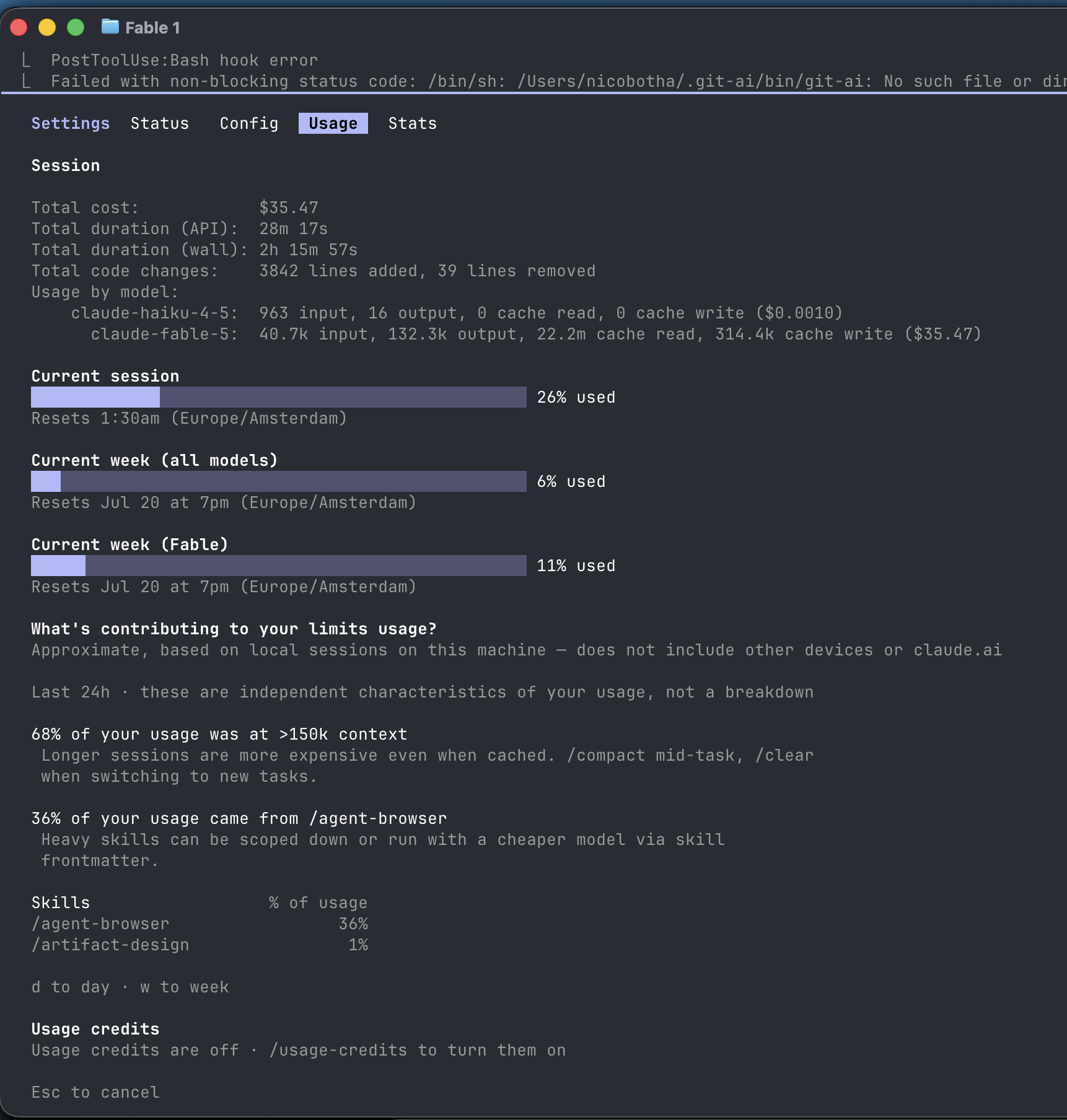
Verdict: the best choice when output quality matters most and the extra cost and operator time are acceptable.
The OpenCode models
Kimi, GLM and DeepSeek ran through the same OpenCode setup, so they provide the cleanest direct cost comparison in this experiment.
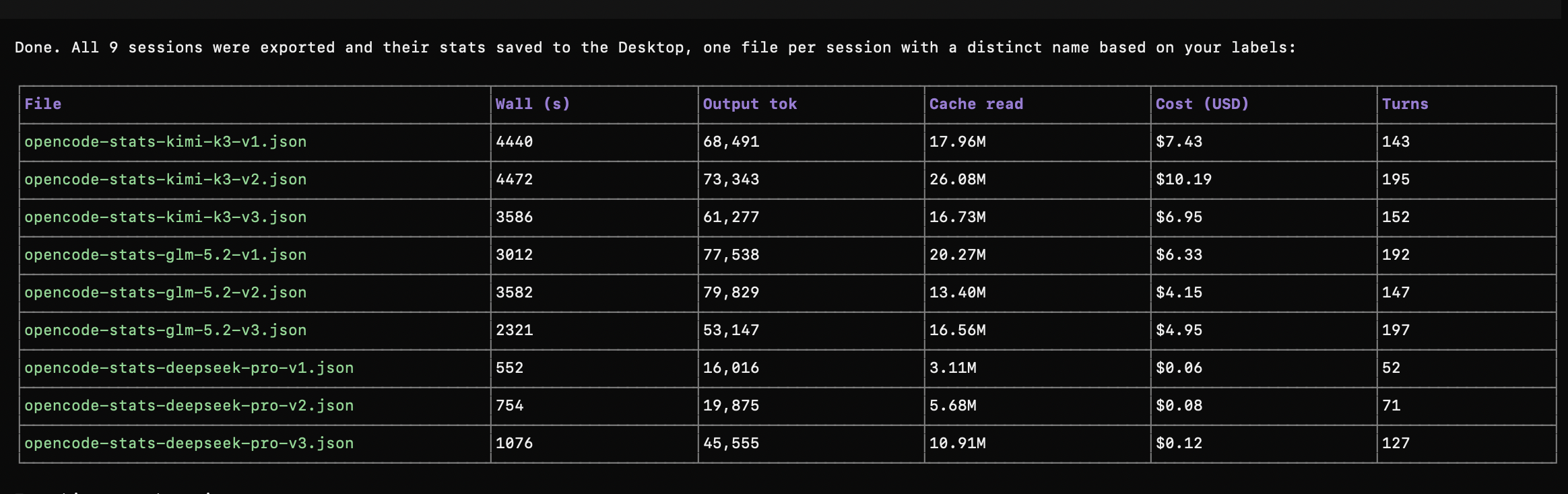
This one screenshot covers all nine sessions. The per-run numbers and reviews are below.
Kimi K3: the surprise second place
Kimi was the slowest OpenCode model and used the most reported reasoning tokens. Its runs took roughly an hour and cost between $6.95 and $10.19.
It also produced the second-best code. One run scored 4/5 and the other two scored 3/5. I did not expect Kimi to finish above GPT, but it did.
| Run | PR | Quality | Session time | Input | Cache read | Output / reasoning | Cost |
|---|---|---|---|---|---|---|---|
| 1 | #10 | 3/5 | 1h 14m 0s | 190,514 | 17,955,034 | 68,491 / 29,792 | $7.43 |
| 2 | #11 | 4/5 | 1h 14m 32s | 232,820 | 26,082,307 | 73,343 / 37,518 | $10.19 |
| 3 | #8 | 3/5 | 59m 46s | 188,181 | 16,733,859 | 61,277 / 30,018 | $6.95 |
Verdict: the best value if you want stronger output than GPT or GLM without paying Fable prices.
GLM-5.2: cheaper, but less convincing
GLM averaged just under 50 minutes and $5.14 per run. It also produced the highest average output-token count of the three OpenCode models, although its telemetry reported zero reasoning tokens (not sure if this is accurate though).
All three implementations scored 3/5. That tied GPT numerically, but GPT’s implementations were stronger in the overall review.
| Run | PR | Quality | Session time | Input | Cache read | Output | Reasoning | Cost |
|---|---|---|---|---|---|---|---|---|
| 1 | #6 | 3/5 | 50m 12s | 513,613 | 20,265,088 | 77,538 | 0 reported | $6.33 |
| 2 | #7 | 3/5 | 59m 42s | 222,942 | 13,397,632 | 79,829 | 0 reported | $4.15 |
| 3 | #9 | 3/5 | 38m 41s | 295,093 | 16,556,864 | 53,147 | 0 reported | $4.95 |
Verdict: a reasonable budget option, but Kimi delivered better code and GPT completed the task faster.
DeepSeek V4 Pro: cheap for a reason
DeepSeek is the economic outlier. The average run took just over thirteen minutes and cost nine cents. All three runs together cost $0.27.
It also finished last on quality. The first run scored 2/5, while the other two scored 3/5. DeepSeek is useful for generating a first pass, but I would not trust it with this kind of feature without a strict review.
| Run | PR | Quality | Session time | Input | Cache read | Output / reasoning | Cost |
|---|---|---|---|---|---|---|---|
| 1 | #1 | 2/5 | 9m 12s | 69,528 | 3,105,792 | 16,016 / 5,554 | $0.06 |
| 2 | #4 | 3/5 | 12m 34s | 92,708 | 5,680,384 | 19,875 / 5,867 | $0.08 |
| 3 | #5 | 3/5 | 17m 56s | 78,202 | 10,909,056 | 45,555 / 11,396 | $0.12 |
Verdict: excellent for cheap prototypes, but the savings disappear quickly if an engineer has to rebuild the feature.
The time, cost and quality trade-off
Fable 5 is the clear winner. It produced the best code overall by far. If quality is the priority, I would choose Fable.
The downside is obvious. It cost around $34 per run, and much of the two-hour wall time was spent waiting for human input. Better output came with more cost and more operator friction (you always have the option to run with claude --permission-mode bypassPermissions but I’m not trusting that in a non-sandbox environment).
Kimi K3 is, surprisingly, the most interesting alternative. It’s hyped by many people online for good reason. It finished second on quality, averaged about $8 per run and completed the task in roughly an hour. That is a strong trade when Fable is too expensive.
GPT-5.6 Sol is another good alternative but you have to pay attention to the quality. Its quality was fairly consistent, it finished in under 40 minutes and its estimated API-equivalent cost was below Fable. It makes sense when an engineer is actively reviewing the work and wants a faster feedback loop. But to be honest, considering the huge hype about GPT-5.6 Sol and the fact that it’s supposed to be a Fable 5 equivalent, I’m actually disappointed in its quality. It’s not nearly as good as Fable.
GLM is cheaper, but its output was less convincing. DeepSeek is dramatically cheaper and faster (for good reason), but it also produced the weakest code. For a security-sensitive, end-to-end feature, that is not a trade I would make.
This was a fun (not very scientific) experiment as a weekend project. And it challenged some of the biases I had about the frontier AI models.